New: Agent API and CLI for scoped poll automation
Pikli's Agent API and local CLI let approved scripts and agents manage room-scoped polls without sharing main account access.
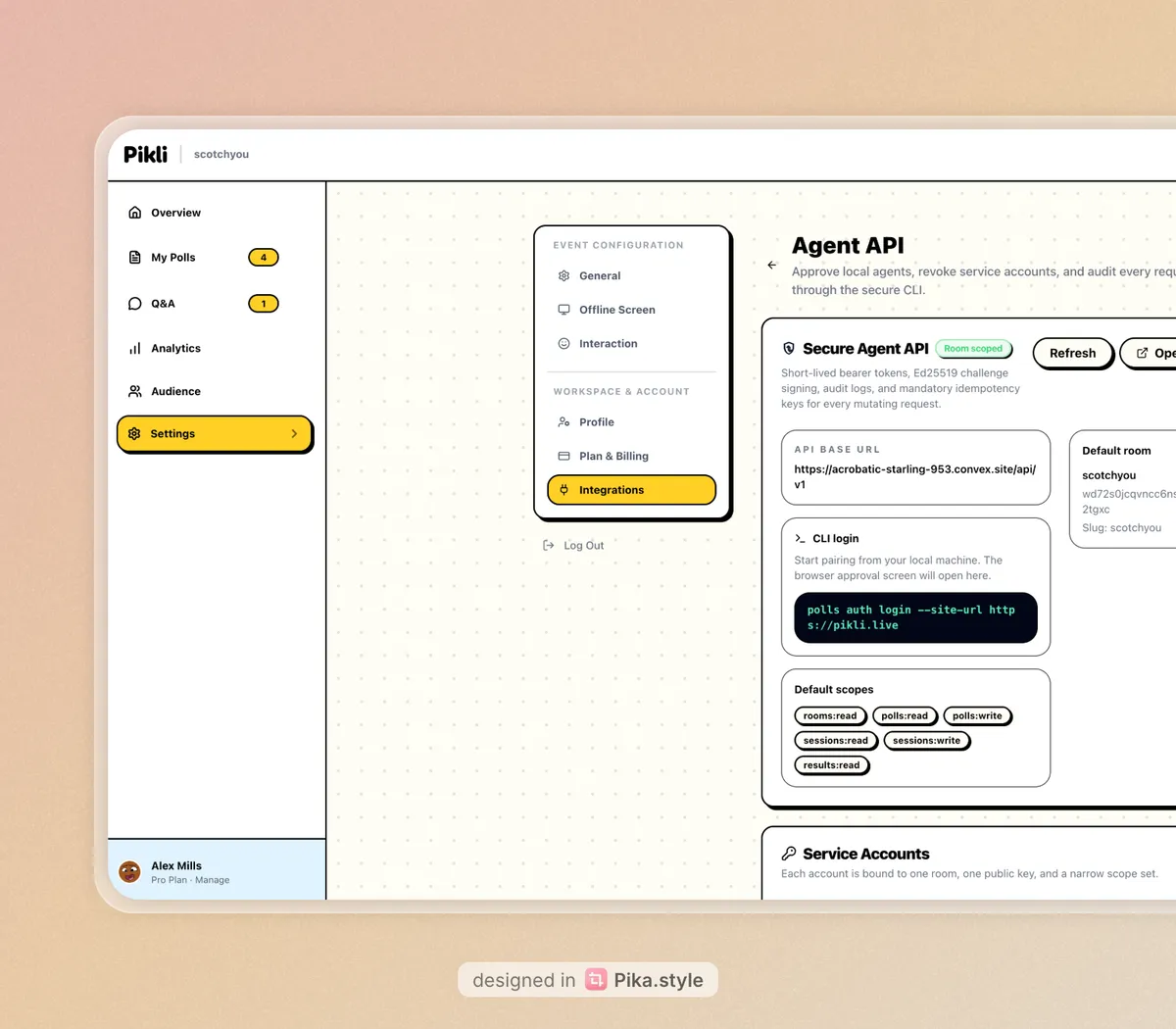
Today we are launching two new building blocks for teams that want to automate poll workflows in Pikli: a secure Agent API and a local CLI.
The goal is simple. You should be able to approve a local agent once, give it room-scoped access, and let it operate on polls without handing over your full account session.
What is included
The release includes:
- a room-scoped Agent API,
- a local CLI login flow,
- short-lived bearer tokens backed by Ed25519 challenge signing,
- audit logs for authenticated requests,
- and idempotency protection for mutating API calls.
In practical terms, an approved agent or script can now list rooms, create polls, update polls, activate polls, complete polls, inspect results, and manage sessions through the new API surface.
How the approval flow works
The local CLI starts an approval request from your machine and opens the Pikli settings page in the browser.
polls auth login --site-url https://your-deployed-site.example.comFrom there you approve the request inside Pikli. That approval creates or reuses a service account that is bound to one room and one public key. The browser then redirects back to the local CLI callback on your machine, and the CLI stores the local credentials it needs for future calls.
After that first approval, the CLI can refresh short-lived access tokens automatically. You do not need to manually approve every create or update request.
What you can automate today
The current CLI is built for scripts, agents, and structured workflows.
You can use it to:
- create a poll from a JSON payload,
- update a poll,
- activate or complete a poll,
- start or end sessions,
- and fetch room, poll, or results data.
Example:
polls polls create --file ./poll.json
polls polls activate poll_123
That makes the current release a strong fit for agentic workflows where another tool decides what poll to create and then calls the CLI or API with structured data.
One important boundary
This is not a prompt-to-poll assistant by itself.
The CLI does not currently accept plain-language instructions like “make me a poll about next sprint priorities” and turn that into a poll automatically. Right now it expects structured input, which is the safer and more predictable place to start for production automation.
If you already have an agent that can generate valid poll payloads, though, the new CLI and Agent API give it a secure way to execute those actions inside Pikli after approval.
Why we built it this way
We wanted the first release to be useful without being reckless.
That meant:
- room-scoped credentials instead of broad account access,
- local approval instead of silent background pairing,
- short-lived access tokens instead of long-lived shared secrets,
- and request logs so every action is auditable.
This gives teams a practical base for internal agents, scripts, and workflow tools without pretending the right security model is optional.
If you want to try it, start with one room, approve the local CLI, and have your agent create a simple multiple-choice poll first. That gets you the shortest path from idea to a working automated poll workflow.
Start free with Pikli
Approve your first local agent in Pikli
Pair the CLI, keep access room-scoped, and let your scripts or agents operate on polls without sharing your main session.
Need help designing the workflow? Book a demo .
Continue exploring
Related guides
Go deeper with practical articles selected from the same topic cluster.
Pikli vs AhaSlides: Live Polling Compared (2026)
Compare Pikli and AhaSlides for live polls, quizzes, Q&A, PowerPoint workflows, free limits, exports, surveys, and audience engagement.
Read article → 02Pikli vs Kahoot: Live Polling and Quizzes Compared
Compare Pikli and Kahoot for live polls, quizzes, Q&A, presentation workflows, free audience limits, reports, training, and classroom use.
Read article → 03Pikli vs Mentimeter: Live Polling Compared (2026)
A practical comparison of Pikli and Mentimeter for live polls, Q&A, quizzes, presentation workflows, free limits, and different audience sizes.
Read article → 04Live Polling in the Classroom: Educator's Guide
Use live polling to check understanding, expose misconceptions, run peer discussion, include quieter students, and choose the next teaching move.
Read article →