Free Tier Maker for Shareable Visual Rankings
Tier lists turn opinions into visuals people can scan, challenge, and share. Learn when a tier maker works best and how to pair it with Pikli for live input.
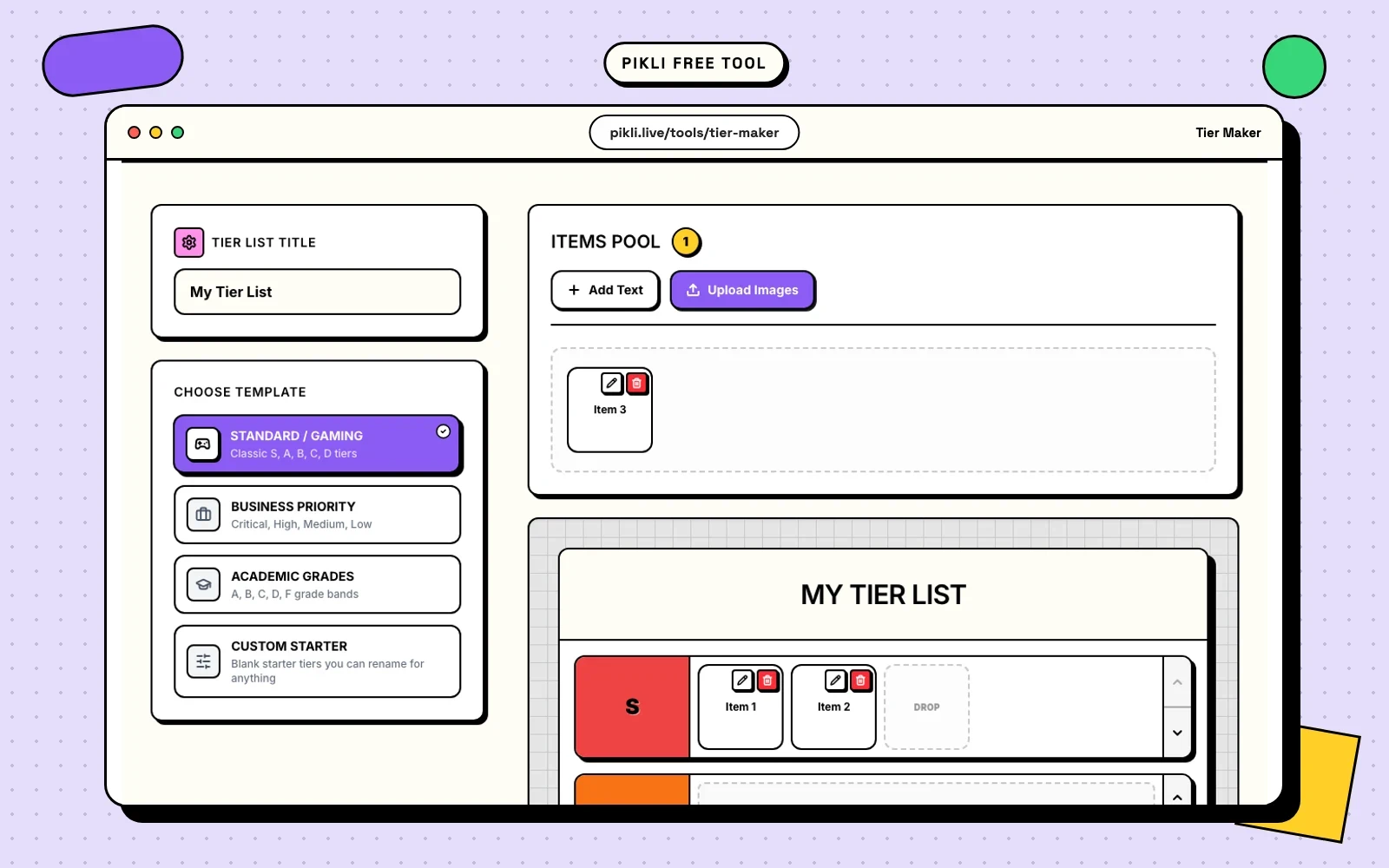
Tier lists work because they make opinion visible.
A plain ranked list asks people to read line by line. A tier list shows the shape of the opinion immediately. Which items are excellent, which are overrated, which are fine, and which do not belong near the top at all? People understand that structure in seconds.
That is why tier lists keep showing up in gaming, creator content, classrooms, product discussions, and team planning. They are easy to scan, easy to argue with, and easy to turn into something shareable.
Why tier lists get stronger reactions than plain lists
A tier list does a few useful things at once:
- it groups items instead of forcing a fragile exact order,
- it makes tradeoffs visible fast,
- it gives people obvious points to agree or disagree with,
- and it works well as a social post, slide, recap image, or discussion starter.
That last part matters. Good visual formats do not only help you think. They help you publish.
When a tier maker is the right format
Use a tier maker when the goal is to sort items into bands, not to obsess over whether one item belongs at number four or number five.
That makes tier lists especially useful when:
- you have a lot of items to compare,
- the audience cares about categories more than exact order,
- you want a visual people can react to quickly,
- or you want to export the result for a post, presentation, or recap.
If you need an exact ranked list, a Top X format may be better. If you want clearer buckets like S, A, B, C, or High, Medium, Low, a tier maker usually fits better.
A simple workflow for making a better tier list
Most tier lists do not need a long process. A simple workflow is usually enough:
- Pick a narrow topic.
- Decide what the tiers actually mean.
- Add the items you want to compare.
- Move quickly at first, then review the choices that feel borderline.
- Export once the result is readable at a glance.
The narrow-topic point is important. “Best games ever” is broad and messy. “Best co-op games for new players” is sharper. Better scope usually leads to a more useful tier list.
Clear labels matter too. If the tiers are vague, people will argue about the labels instead of the items. That can be fun once, but it is not helpful if the goal is clarity.
Common ways people use tier lists
Creators and communities
Creators use tier lists for game rankings, character debates, episode recaps, product hot takes, and community picks. The format works because the audience can react instantly and suggest changes without needing a long explanation first.
Teams and business decisions
Tier lists also work in product and business settings. Teams use them to sort feature ideas, compare vendors, review experiments, assess opportunities, or group priorities before a roadmap conversation.
It is not a replacement for deeper evaluation. It is a fast way to make the first pass visible.
Education and workshops
Teachers and facilitators use tier lists to group concepts by difficulty, compare examples, review student answers, or structure discussion topics. A visible ranking gives people something concrete to challenge, defend, or refine.
Try Pikli’s free Tier Maker
If you want to turn a rough opinion into a clean visual quickly, use the Tier Maker. It is free to use and built for fast drag-and-drop sorting, image uploads, customizable tiers, and simple exports when the list is ready to share.
That makes it useful for creators building a post, teams preparing a slide, or anyone who wants a ranking that looks intentional without opening a full design tool.
Use the Pikli app when you want the audience to shape the ranking
The Tier Maker is great when you already know the items and want a polished final board.
The Pikli app solves the step before that. It helps you collect live input through polls and audience interaction, so the ranking is not only your opinion. It can start as a signal from the room.
That works well for flows like these:
- run a quick poll to decide which options should make the tier list,
- collect audience reactions during a stream, class, or workshop,
- then turn the winning items into a visual tier list you can share afterward.
For creators, that means audience picks can become a follow-up asset. For teachers, it means classroom input can become a recap board. For teams, it means a discussion can move from live opinions to a clean visual summary.
The combination is simple: use Pikli to gather the signal, then use Tier Maker to package that signal into something people can see, discuss, and share.
Tier lists do not work because they are complicated. They work because they make a point of view visible fast. If you already have the topic, that is enough to start.
Free to use on Pikli
Try Pikli's free Tier Maker
Build a visual tier list fast, customize the tiers, and export it when it is ready to share.
Want the audience to shape the ranking first? Start free with Pikli .
Continue exploring
Related guides
Go deeper with practical articles selected from the same topic cluster.
Top X Generator for Fast Visual Rankings
Create professional visual rankings instantly with our free Top X generator. Perfect for social media, presentations, and content marketing.
Read article → 02Pikli vs AhaSlides: Live Polling Compared (2026)
Compare Pikli and AhaSlides for live polls, quizzes, Q&A, PowerPoint workflows, free limits, exports, surveys, and audience engagement.
Read article → 03Pikli vs Mentimeter: Live Polling Compared (2026)
A practical comparison of Pikli and Mentimeter for live polls, Q&A, quizzes, presentation workflows, free limits, and different audience sizes.
Read article → 04New: Agent API and CLI for scoped poll automation
Pikli's Agent API and local CLI let approved scripts and agents manage room-scoped polls without sharing main account access.
Read article →